top of page
.png)
Designing for Client Needs
Wedding Video Project
Tools Used:
To create this wedding video project, I used:
-
Adobe Premiere Pro
-
Excel Sheet
Project Overview
I’ve always felt that wedding videos shouldn't just be a collection of random clips set to music. For this project, I really wanted to capture the actual "vibe" of the day. I started by communicating with the couple to figure out what they actually valued; whether it was the small candid moments or the big traditional highlights. Getting those details on pacing and music sorted early on meant I could edit with a clear goal in mind, rather than just guessing.
My Process
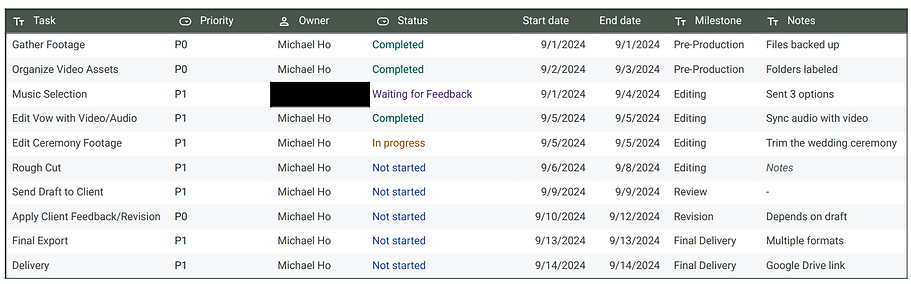
I actually pulled a lot from my instructional design background here. I don't just "edit"—I structure the footage to tell a story. Using Premiere Pro, I worked on blending the cinematic wide shots with those raw, "blink-and-you-miss-it" moments so the final film felt cohesive and intentional.
To keep myself sane and the project on track, I used a custom Excel tracker for my deadlines and feedback loops. It’s a simple system, but it ensured nothing got lost in the shuffle and allowed me to hit every milestone without the usual "last-minute" stress. We went through a few rounds of drafts together, and because we’d communicated so well at the start, the final version was exactly what they were looking for.
bottom of page